Does MetaTaken upload my images?
No. The desktop image-processing workflow is designed to inspect, clean and verify supported images locally on your computer, with no cloud image-processing path.
Does MetaTaken overwrite my originals?
No. MetaTaken never cleans an image in place or overwrites your original. Cleaning creates a separate output copy, and an existing cleaned output is not silently overwritten.
Will cleaning remove the date my photo was taken?
It can. Privacy Clean targets timestamps, and Full Metadata Clean removes supported metadata more broadly. That can include the photo's capture date where it is stored as removable metadata. Your original is never overwritten, so the original file keeps its original metadata.
Does MetaTaken change the picture itself?
MetaTaken changes metadata structures in the cleaned copy, but it does not intentionally alter image pixels. After cleaning, decoded pixel content is compared where supported and the result is reported rather than assumed.
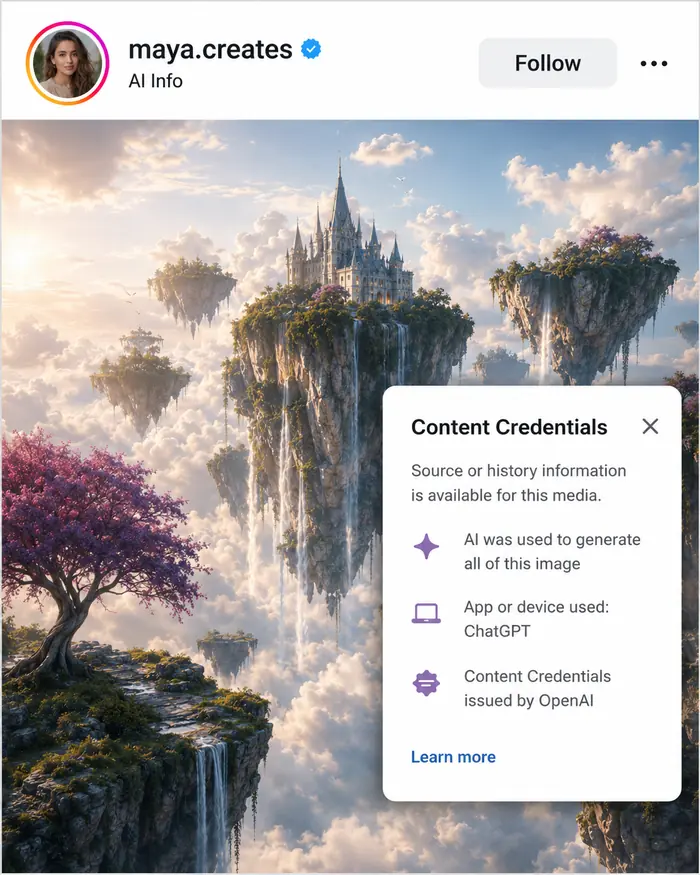
Can MetaTaken remove AI Content Credentials and help avoid an “AI content” label?
Yes, Full Metadata Clean targets supported C2PA / Content Credentials / JUMBF provenance and generator metadata. When a platform applies a label from those embedded credentials, removing them can prevent that metadata-based label from following the cleaned file. Platforms may also use independent detection methods, so MetaTaken cannot guarantee how every service will classify every upload.
Can MetaTaken remove AI detection from an image?
MetaTaken can remove supported file-level AI provenance and metadata signals such as C2PA / Content Credentials, JUMBF and generator metadata. It cannot guarantee what an independent platform classifier will decide, and it does not claim to remove pixel-level watermarking such as SynthID. See the full explanation.
Why use a local Windows app instead of an online metadata remover?
MetaTaken's image-processing workflow runs on your PC, so there is no MetaTaken cloud image-processing service receiving the file. Some web tools also process locally in-browser, while others upload files; MetaTaken deliberately uses a desktop workflow with no image upload, no account and no app telemetry. Read about local processing.
Does MetaTaken remove SynthID?
No claim is made about removing pixel-level watermarking such as SynthID. Current SynthID status is: Not tested / detection unavailable.
Does “Clean” mean my image is guaranteed anonymous?
No. MetaTaken reports what it can detect, remove and verify. It deliberately uses Cleaned with Notes, Failed, Unsupported or uncertain outcomes when stronger claims are not justified.
Why would a file show Cleaned with Notes?
Cleaned with Notes means cleaning completed, but something remains, is uncertain, is structurally protected, or could not be safely handled or verified. MetaTaken prefers that over a false Clean result.
Is MetaTaken free?
Yes. MetaTaken for Windows is proprietary freeware: free to download and use.